Membahas tentang Games PC Cara agar main game pc tidak lemot,patah-patah,atau crash , banyak sekali orang yang mengalami masalah dalam bermain game sebenarnya itu diakibatkan PC anda tidak mendukung dengan game itu jadi jika anda menggunakan Virtual Technology kemungkinan anda dapat mengatasi masalah yang terjadi saat anda memainkan game pc maupun saat anda ingin menginstall game pc.
Biasanya akan dialami jika anda memainkan sebagai contoh PC Games GTA 5 (IV) dan game yang lainnya ataupun masalah ini bisa terjadi pada emulator untuk android bisa disebut juga pada Nox App, jadi jikan anda menggunakan Virtual Technology akan jauh lebih enak saat anda memainkannya di PC.
1. Yang paling pertama yaitu mengecek komputer anda mendukung Virtual Technology atau tidak , bisa anda cek dengan Download LeoMoon CPU-V, tidak hanya mendeteksi CPU Anda tetapi mendukung Hardware Virtualization, juga Mendeteksi jika Hardware Virtualisasi Diaktifkan di BIOS.

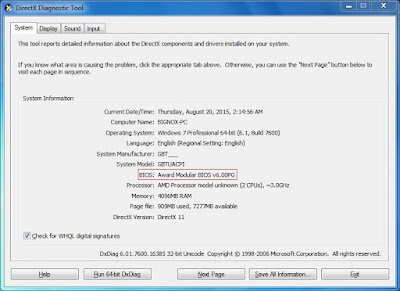
2. Cari tahu jenis BIOS Anda: Tekan Win + R untuk membuka "Run" kotak atau klik start menu ketik Run , masukan "Dxdiag" dan klik "OK". Kemudian Anda akan melihat informasi BIOS Anda seperti yang ditunjukkan pada gambar di bawah.

Biasanya akan dialami jika anda memainkan sebagai contoh PC Games GTA 5 (IV) dan game yang lainnya ataupun masalah ini bisa terjadi pada emulator untuk android bisa disebut juga pada Nox App, jadi jikan anda menggunakan Virtual Technology akan jauh lebih enak saat anda memainkannya di PC.
1. Yang paling pertama yaitu mengecek komputer anda mendukung Virtual Technology atau tidak , bisa anda cek dengan Download LeoMoon CPU-V, tidak hanya mendeteksi CPU Anda tetapi mendukung Hardware Virtualization, juga Mendeteksi jika Hardware Virtualisasi Diaktifkan di BIOS.
Jika hasil pemeriksaan Anda menunjukkan tanda centang hijau di bawah VT-x yang didukung, itu berarti komputer Anda mendukung virtualisasi. Jika itu tanda silang merah, maka komputer Anda tidak mendukung VT, tapi Anda masih bisa menginstal aplikasi selama Anda memenuhi persyaratan instalasi.
2. Cari tahu jenis BIOS Anda: Tekan Win + R untuk membuka "Run" kotak atau klik start menu ketik Run , masukan "Dxdiag" dan klik "OK". Kemudian Anda akan melihat informasi BIOS Anda seperti yang ditunjukkan pada gambar di bawah.
3. Cari di Google bagaimana ke BIOS. Restart Komputer anda Biasanya setiap masuk BIOS hampir sama semua F2 atau Delete menekan tombol berulang kali saat komputer Anda menyala kembali. Setelah Anda masuk ke mode BIOS, mencari Virtualisasi, VT-x, Intel Virtual Teknologi atau apa pun yang mengatakan "Virtual" dan mengaktifkannya. Setelah selesai, Simpan matikan komputer Anda benar-benar kemudian hidupkan kembali. Sekarang Virtualisasi diaktifkan dan kinerja Saat bermain Game bahkan lebih baik.

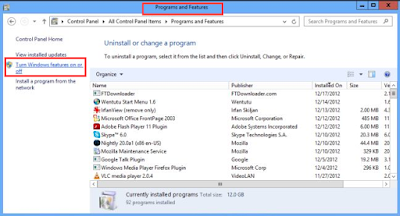
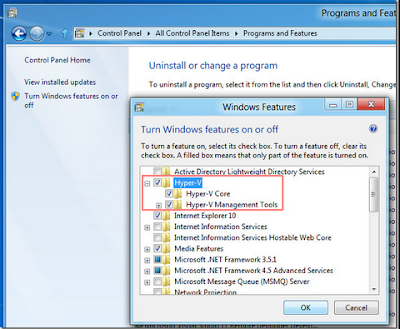
Jika Anda menggunakan Windows 8 atau Windows 10, mungkin berbeda VT dan Microsoft teknologi Hyper-V. Mari matikan Hyper-V off mengikuti langkah berikut: pergi ke Control Panel> Program dan Fitur-> Aktifkan fitur Windows atau off> un-centang kotak sebelum Hyper-V.


Jika VT Anda diaktifkan di BIOS, tetapi hasil pemeriksaan LeMoon masih menunjukkan silang merah di bawah VT-x Diaktifkan, itu sangat mungkin bahwa perangkat lunak anti-virus Anda telah memblokir fungsi ini. contohnya Avast! , untuk memperbaiki masalah ini:
1) Buka Avast anti-virus >> Settings >> Troubleshooting

2) Hapus tanda centang pada Enable hardware-dibantu virtualisasi, kemudian reboot komputer Anda
Comments
Post a Comment