
XP system: Graphics driver not compatible solution

For some Windows XP users whose Open GL ≥ 2.0 yet still have compatibility issue with the graphics card driver will encounter the below error message when starting up Nox.
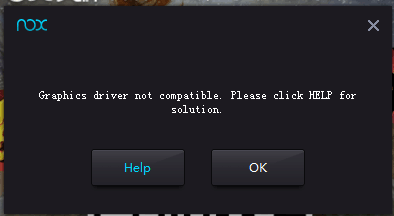
XP Graphics driver roll back
The solution is to roll back your driver. Usually a previous version published around 2012 will work. You could either go to the official website of your graphics card manufacturer and try different driver versions or follow the steps below:
Step1: Download and install Driver Talent: https://www.drivethelife.com/
Step 2: Start Driver Talent and click Hardware
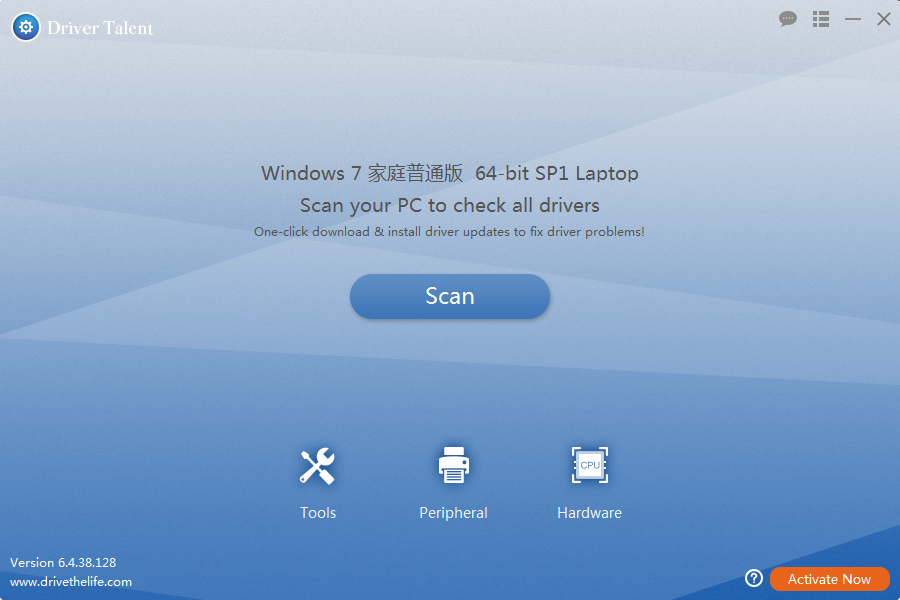
Driver Talent-1
Step 3: Click Download & Update in the left Navigation Bar and you will find your driver information for all your devices listed on the right side of the window. In the dropdown list of the graphics driver, choose a version of previous year. (2012 version is recommended for XP system)
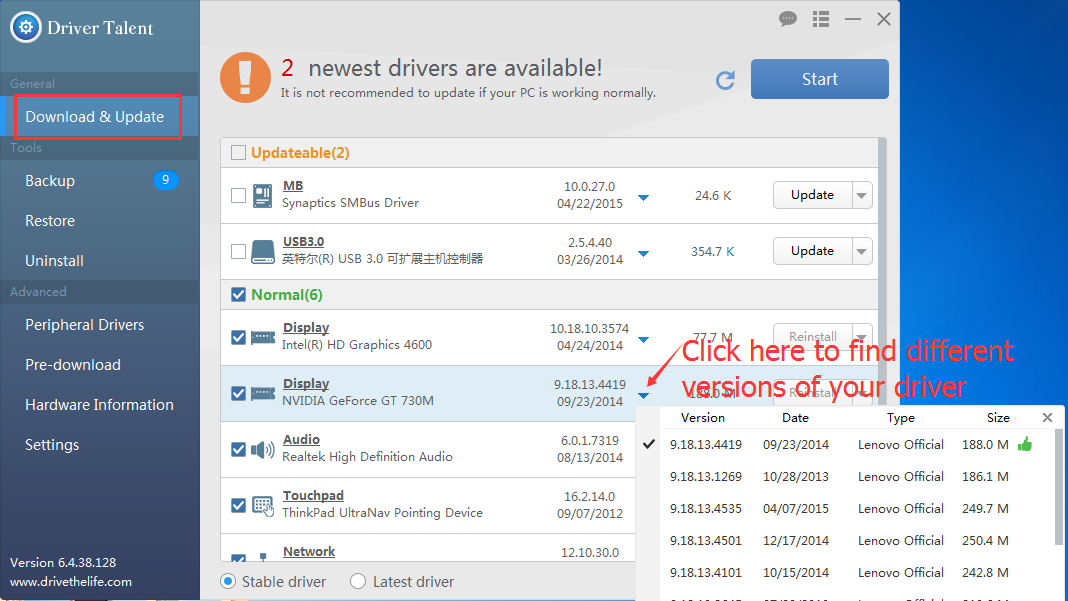
Driver Talent-2

Step 4: Click Update to install the chosen graphics driver. Then restart your computer and Nox.
That should fix the problem.

Comments

Popular posts from this blog

Reflector 3 Mirroring Free For Iphone

Reflector 2 is a wonderful wireless mirroring application to help you stream your data, video, and content to the big screen without using any wires. Using it, you can easily play games, watch movies, present your demos and much more from your own palm. Developed by Squirrel LLC, you can buy this smart screen mirroring application for just $14.99 from the store. The reflector has many luring features which have made it very popular among the users. It has Smart Layouts which make it choose the best layout automatically when multiple devices are connected. The another feature lets you spotlight one screen that matters most when multiple devices are connected. You can easily hide and show devices without disconnecting it. The most killing feature is that you can directly send the mirrored screen to YouTube. The official website from where you can download it is http://www.airsquirrels.com/reflector/download/. It is a very user-friendly app which involves such few steps to use it. Link ...

GUIDE CARA MEMBUKA AVATAR PUBG MOBILE YANG TERKUNCI!

Avatar atau foto profil adalah suatu hal yang wajib ada di dalam sebuah game. Pemain bisa mengganti avatar mereka sesuka hatinya. Di  PUBG Mobile , kamu juga bisa mengganti avatar sesuai dengan yang kamu mau lho! Namun, Avatar yang ada di  PUBG Mobile  harus kamu buka dengan menjalankan misi yang diberikannya. Hari ini  G CUBE  akan memberitahu kalian cara membuka Avatar  PUBG Mobile  yang terkunci! Yuk Simak Artikel dibawah ini! ^^ Avatar yang Ada di PUBG Mobile dan Cara Membukanya Ada  19 avatar  yang bisa kamu buka di PUBG Mobile ini. Berikut adalah listnya: Social Network Jika kamu login menggunakan  Facebook  atau  Twitter , biasanya Avatar ini akan langsung terbuka. Tetapi jika kamu  log in  dan bermain menggunakan " Guest ", kamu tetap bisa menghubungkan akun  Facebook  dan  Twitter mu. Dengan cara membuka setting, lalu di bagian atas kanan ada " Linked Account " d...

Cara pasang plugin di Photoshop Portabel

Bagaimana  Cara pasang plugin di Photoshop Portabel , jika kita pasang langsung di photoshop installan maka secara otomatis  plugin  akan masuk ke Menu Filter. Tapi bagaimana dengan photoshop portabel. Oke kali ini saya akan share cara menambahkan plugin di photoshop portabel. 1. Pada tahapan awal saya anggap anda sudah melakukan penginstalan plugin dan mempunyai photoshop portable. Lihatlah ke Menu Filter, terlihat pada gambar plugin belum terpasang, dalam kasus ini saya akan menambahkan plugin dari Nik.   Sekarang lihat menu Edit-Preferences-Plug-Ins  2. Pada Pilihan disebelah kiri, pilihlah Plugin, tekan tombol Choose, Cari lah folder Plugin Nik, biasanya ada di folder program file. Pilih dan OK, Jika ingin semua plugin di pasang maka yang dipilih adalah drive C.. Jika sudah di OK, close photoshop Portable tadi, dan buka kembali maka Plugin Nik Sudah terpasang di menu Filter.. Mudahkan Cara pasang plugin di Photosho...