
Tips & Trik Mobile Legends Bang - Bang 100000% Work

Ya, kamu bisa melancarkan serangan secara terus-menerus alias nonstop ke creep atau hero musuh tanpa perlu kamu klik atau menyentuh layar sedikit pun! Bukan sihir, kamu bisa melakukannya dengan bantuan sebuah aplikasi bernama Automatic Tap - Auto Clicker. Kamu bisa langsung download aplikasinya via tautan yang Jaka sediakan di bawah.
Lalu gimana cara mengaktifkan cheat menyerang hero musuh secara otomatis? Pastikan dulu kamu sudah menginstall aplikasi tersebut di smartphone atau perangkat Android milikmu. Jika sudah, kamu cukup ikuti langkah demi langkah di bawah ini:
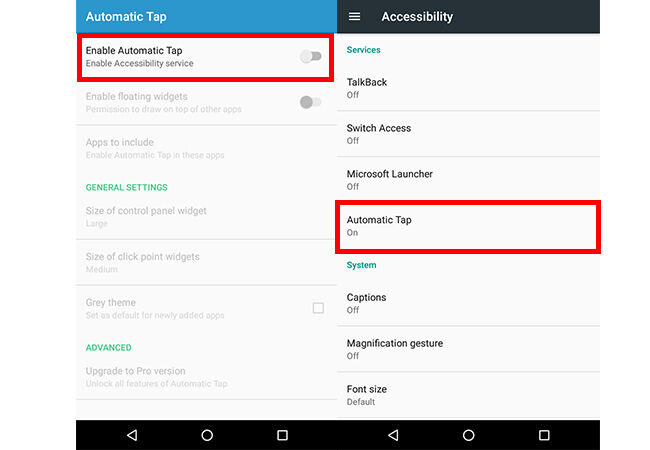
  • Buka aplikasi Automatic Tap - Auto Clicker, lalu aktikfan Enable Automatic Tap. Aktikfan juga Automatic Tap dalam menu pengaturan smartphone kamu.
cheat-mobile-legends-1
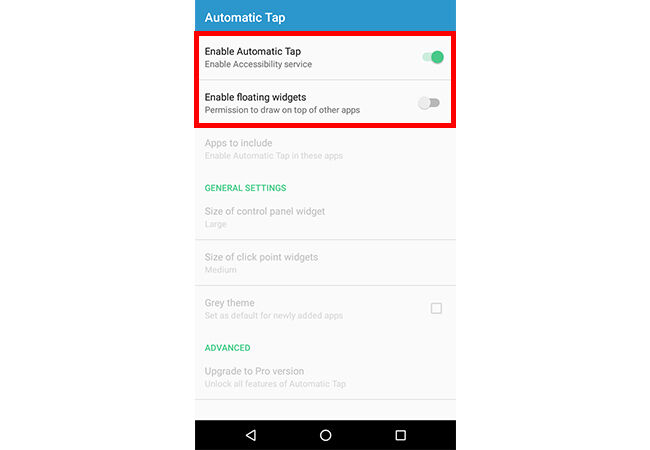
  • Selain Enable Automatic Tap, jangan lupa untuk mengaktifkan juga Enable floating widgets.
cheat-mobile-legends-2
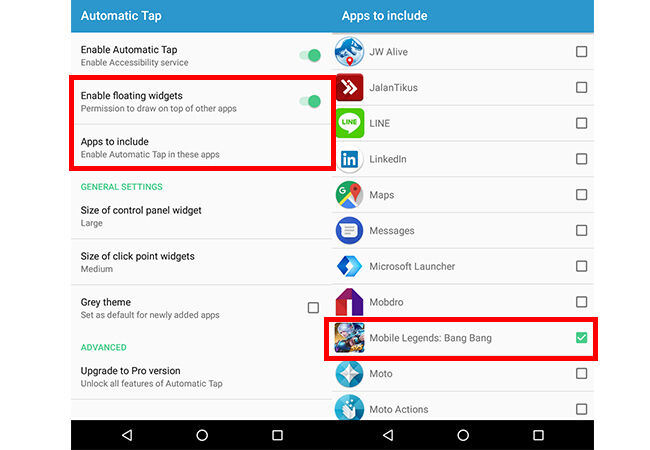
  • Setelah dua menu di atas aktif, lanjutkan dengan memilih Apps to include untuk menentukan aplikasi mana saja yang ingin kamu berikan fitur sentuh otomatis. Pilih Mobile Legends: Bang Bang sebagai salah satu aplikasinya.
cheat-mobile-legends-3
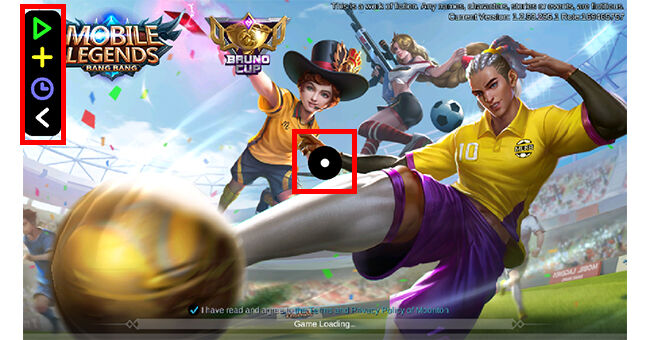
  • Jika sudah, lanjutkan dengan langsung membuka game Mobile Legends di smartphone Android kamu. Jangan kaget dengan adanya tombol virtual tambahan yang terletak di sebelah kiri atas dan bagian tengah layar kamu karena itu adalah tombol virtual dari aplikasi Automatic Tap.
cheat-mobile-legends-4
  • Kamu bisa langsung segera memulai permainan. Jika sudah berhadapan dengan creep atau hero musuh, segera gunakan fitur yang ada di aplikasi dengan mengarahkan pointer ke tombol penyerangan yang ada di sebelah kanan bawah. Jika sudah pilih ikon play berwarna hijau yang ada di sebelah kiri atas untuk mengaktifkan mode sentuh otomatis.
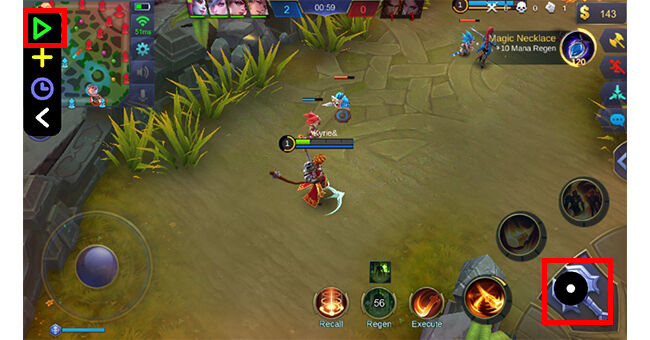
cheat-mobile-legends-5
  • TARAA! Setelah fitur bekerja, hero kamu akan otomatis menyerang hero musuh secara terus-menerus tanpa perlu kamu klik.
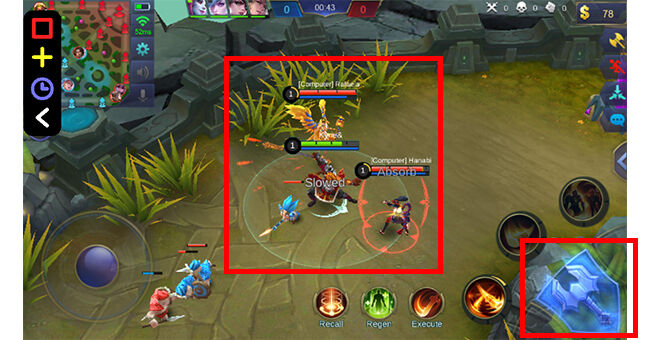
cheat-mobile-legends-6

Akhir Kata

Itulah cheat Mobile Legends untuk menyerang hero musuh secara otomatis tanpa perlu klik terus-menerus. Meski bisa sangat membantu, kamu harus tetap built item dan melakukan combo skill dengan benar dan tetap secara manual ya. Baru deh, kamu bisa memenangi pertarungan dan bukan mustahil nantinya bisa mengalahkan top global player sekalipun. Selamat mencoba

Comments

Popular posts from this blog

Reflector 3 Mirroring Free For Iphone

Reflector 2 is a wonderful wireless mirroring application to help you stream your data, video, and content to the big screen without using any wires. Using it, you can easily play games, watch movies, present your demos and much more from your own palm. Developed by Squirrel LLC, you can buy this smart screen mirroring application for just $14.99 from the store. The reflector has many luring features which have made it very popular among the users. It has Smart Layouts which make it choose the best layout automatically when multiple devices are connected. The another feature lets you spotlight one screen that matters most when multiple devices are connected. You can easily hide and show devices without disconnecting it. The most killing feature is that you can directly send the mirrored screen to YouTube. The official website from where you can download it is http://www.airsquirrels.com/reflector/download/. It is a very user-friendly app which involves such few steps to use it. Link ...

iOS Screen Recorder Free For Iphone Mirroring

is one of the best solutions for screen mirroring for your iPad, iPhone or iPod. With iOS Screen Recorder, you can easily record the screen of your device. It allows you to mirror your iOS device on your computer wirelessly, record games, videos and much more. It is one of the cool application developed from Wondershare for the users for recording and mirroring the screen of an iOS device. Dr Phone-iOS Screen Recorder is very easy to use, and you can record and mirror your device screen in just a few steps. You can buy this wonderful mirror app from the official website of Wondershare. You can use this link for buying it: https://drfone.wondershare.com/buy/drfone-ios-screen-recorder.html. You can also try it for free for testing, but all features are not free of cost . Link Here

How to fix “Nox App Player has stopped working” error by increasing the virtual memory size in your computer

If your computer shows the above error message when running Nox, you could fix it by changing the Virtual Memory Paging File Size. By default, the virtual memory (also known as paging file) size is managed by Windows and it could change automatically. This may cause the above problem “Nox App Player has stopped working”. To solve this problem, simply follow the below steps to change the virtual memory size: 1. Right click the Computer icon on your desktop and then click  Properties . 2. Go to  Advanced system settings  in the left navigation panel. 3. In the  System Properties  windows, go to  Advanced  tab and click  Settings  under Performance. 4. Keeping going to  Advanced  tab and click the  Change  button. 5. Uncheck “”Automatically manage paging file size for all drivers” and select “Custom size” below it. Usually when set your own virtual machine size, it is recommend that you set it to your phy...